Sunday, February 13, 2011

How Windows 8 will try to compete with Android and Mac OS X

 
What we know about Windows 8 is still incomplete and unofficial - garnered from job postings, rumours and the slides allegedly leaked by a software engineer at HP responsible for OEM relations (available through the Italian Windows Ette site).

The slides include plenty of marketing ideas rather than technical details, they show that Microsoft has its eye on what Apple is doing to make its operating systems so popular and they declare themselves a work in progress.

Not only is every page marked 'this is not a plan of record' but the opening discussion includes the line "reality: there are currently more ideas than there is time to implement them". That's especially true if Windows 8 release date is as soon as we think it might be.

Windows 8 release date

Windows 8, say the slides, will be available "for the holiday" - but not which one.

There's a timeline that doesn't have many dates; the one suggesting that the coding would begin in June is suspect when some sources say the M1 (milestone 1 build) is already done and there's what we assume is a typo that we'd correct to say the third Forum (rather than the second) would be in July (there are several points where the slides are incomplete or confusing; for instance a pointed reference to "creating great Dell + Windows Experiences" in a deck that otherwise tips the hat - and appears to have been intended for - HP).

It puts the first beta of IE9 in August, along with the shipping date for Windows Live wave 4 which fits other rumours and positions them just after the third Forum.

That makes the forums three-to five months apart; assuming an average of four months - and assuming the chart is to scale and that the dates don't slip - that puts Windows 8 beta release date a little before March 2011 and Windows 8 RTM shortly after July 2011 (a date suggested on the blog of a now-ex Microsoft employee which you can find preserved, with the boxed version following in the autumn - for the holiday).

We've said before that we expect Windows 8 in late 2011 or early 2012 and we don't expect Microsoft to talk about a date until the Milestone 3 build, which would be around November 2010 by these calculations.

The fact that Microsoft hasn't announced whether the Professional Developers conference (usually held in November and used to preview new versions of the OS) will happen this year makes this a little less likely and it could all be some months later.

There are several statistics (typical RAM, network connected TVs, mobile broadband penetration and 4G deployment) that talk about the specs that will be common - in 2012.

Interestingly, the timeline shows Windows Live Wave 5 with a short development cycle that finishes before Windows 8; that matches suggestions that Live will offer more cloud services for Windows 8.

Windows 8 tablets are coming
The leaked slides are aimed at PC manufacturers who are interested in new form factors - and in getting a share of the iPad market - so it's no surprise one of the key PC form factors is a 9" slate (which Microsoft, having obviously got the point of all those iPad ads, is calling a Lap PC), optimised for web and media, casual gaming, reading and sorting email, IM and social networking.
Microsoft promises big improvements to the on-screen keyboard: it will be "easily launched, text prediction is more accurate, the UI is more usable, and throughput is increased for everyone".
There's also the workhorse PC (which is also referred to as a laptop, because Microsoft is only talking about consumers and not business users) and the family hub (an all-in-one touchscreen system that can go in the kitchen or the living room as a media centre) which is for casual gaming, web and media as well as more demanding apps like organising and manipulating media.
Key to making a successful Windows tablet is apps with user interfaces that change depending on the form factor (touch and gestures instead of keyboard and mouse), but Microsoft is also looking at stereoscopic 3D and high colour displays and natural input that uses touch, voice, 3D gestures ("on the horizon"), and facial recognition.

Optimising "for smaller screens" will help netbook users as well; Windows 7 gets key dialog boxes to fit on a small screen but not all apps do.

Another app store
More than 30 app stores have launched in the last year and Microsoft isn't the only company copying Apple here; Intel has its own app store for Atom PCs. PC makers like the idea - apparently at the first forum they commented that it "can't happen soon enough".
With an app store, Microsoft hopes to attract more of the type of developers who are currently building smartphone apps and it wants them to create apps that make Windows the best place to use web apps (a job advert last October claimed "we will blend the best of the web and the rich client by creating a new model for modern web applications to rock on Windows".)
According to the slides, "Currently the indication is that app development will move to the Web. There is significant opportunity for Microsoft if hardware capabilities, and OS services and Web could be integrated into a hobbyist developer toolset."
The 'tailored experiences' Microsoft talks about for Windows 8 sound like smartphone apps; the checklist includes fast installation and updates for engaging, social, extensible, ad-supported or 'freemium' apps.
If smartphone-style apps sound too simple to be worthwhile on Windows, Microsoft wants apps to be extensible so you can share information between them - perhaps using a mix of simple apps together. It sounds like the 'mashups' that we were all going to be making online until it turned out you'd have to learn to program.
The Windows Store will be branded and optimised for each PC manufacturer. Your settings will follow you from PC to PC, as will your apps (although some slides refer to this as a possibility rather than a definite plan) - but you'd need an HP ID to log into the 'HP Store powered by Windows' and get your HP-specific apps. Microsoft doesn't plan to make money from the store; the slides call it "revenue neutral".

Windows 8 multimedia
Windows 8 will have better media playback and recording, but it will balance using hardware acceleration to save battery life and using the CPU when it gives a better result.
Audio will use hardware acceleration more because that does improve battery life. There will be post-processing to take out blur, noise and shakey video filmed on a phone or webcam, and support for more codecs including AVC and as-yet-undetermined 3D video codecs (stereoscopic3D support is coming, for games and for 3D movies in Media Center, but there are format issues).
Microsoft talks about sharing 'with nearby devices'; one way that will work is adding the Play To option currently in Windows Media Player to the browser for HTML 5 audio and video content, so you can play it on any device that supports DLNA, another is APIs to let other software do the same.
That will work with DRM content, if it's protected with DTCP-IP (digital transmission content protection over IP) or Microsoft's own PlayReady and hardware acceleration will speed up DRM decoding.
There's also a new 'remote display' option that will let you send your screen from a laptop to a large monitor (which will use DirectX hardware acceleration and the same multimonitor interface that's already in Windows 7, but for wireless displays as well, which could be an Internet-connected TV - Microsoft refers to 35% of TVs having network connectivity by 2012 and wonders whether to prioritise Internet TV over further improvements to broadcast TV).


Monday, February 7, 2011

How To Hack Nokia Firmware And Install Any Unsigned Application !


a few weeks ago I bought a nokia E63 to replace my mobile phone sold.
but once I install applications and themes there are some who showed signs of error, "Certificate error" as this is the caption.
So,If you are using a Nokia Phone which has a symbian operating system then you must have tried to install an application and failed because of : Certificate error. Now your problem is going to end soon as i am going to give you a way to install any unsigned application on your symbian device. I hope you all will like it. Well, hacking Symbian devices are not very difficult task to do. I know you all must have tried to Google it before reading this post and must have found many ideas and ways to hacking your phone but the way which i am going to show you is the most easiest, permanent and the most secured way i would say.
Admin warning : Hack at your own risk. I am not liable for any loss or damage.
So, before making you much wait, I start the proceedings. I try to make it as easy as possible so that you all can understand it without any haze. I note down and explain each and every point perfectly and list down the things you will need. Note one thing that the information you provide about your phone will be secured.

Things you will need :
1. Get an account on OPDA and login to it. After redirection, Click onapply cer.
2. Fill in your all information about your phone in those appropriate fields as asked. You will be given a confirmation message after a successful submission.
3. If you submit your application for certificate successfully, you will get your certificate and key which you will need to download from logging in again.
4. Download FreeSignerand install it in your phone.
5.Download HelloOx2 and save the file in your phone. Remember : Don’t Install.
6. Now get your certificate and key from OPDA and save them in your phone.
7. Open FreeSigner and go to settings and map your certificate and key in those appropriate fields. Go back and select Add Task and map your HelloOx2 file there which you saved as referring to point number 5 above !
8. Now press option > Go and wait for a moment. Now go to the drive where you saved your HelloOx2 file.
9. You will get a new file named HelloOx2Unsigned_Signed. Now install this file and Restart your phone.
10. After a restart, run the application and wait for some time ! You will get a confirmation once the process is done !

This is It ! Now your phone is ready with a firmware hack ! You may install any unsigned application you want !

Feel free to leave a comment if any problem or confusion. I hope you liked my post ! Please leave a word of appreciation as they inspire me to write more for you

Friday, January 21, 2011

Better YouTube Support in Blogger

Blogger allows you to upload your own videos via the Blogger Post Editor. It also allows you to embed YouTube videos into your posts(by copy pasting the YouTube embed code into your post editor). Now Blogger has made this process even more simpler by providing a better interface for adding YouTube videos.
This YouTube integration is available only in the Updated Post Editor. So if you are still using the old editor, it’s a good time for an upgrade.

This feature is currently available in the draft version of blogger. So, to test this new feature,you should login to your Draft Dashboard (http://draft.blogger.com) instead of the regular one(http://www.blogger.com)
image
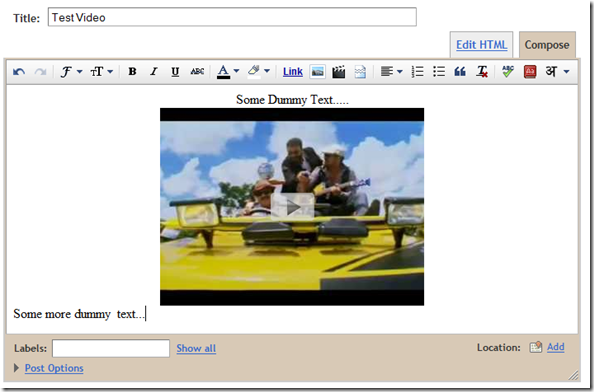
Search for some video using some keywords, select the video and click the select button
image
Now you should see the video in your post Editor. You can continue editing the post using the WYSIWYG Editor and publish it. If you are trying to embed your own YouTube videos(The ones uploaded to YouTube by you), then you can use the “My YouTube videos” Tab.
image

Sharing a  video from YouTube.

YouTube has  got a Blogger Share Button which will enable you to quickly post the video onto your blog.This might be very useful when you suddenly stumble upon some interesting video and want to post it onto your blog.
image
If you have multiple blogs, select the appropriate one from the Popup Post Editor and you can quickly publish the video to your blog.
image

Thursday, January 20, 2011

Create a Facebook Fan Page for your Blog


Facebook is a great Social Networking Site to promote your blog or brand. Most of the major brands do have a Facebook Fan Page. Here are some examples of Facebook Fan pages – Cybercomputery FB Fan . Are you impressed and wanna create one for your blog? I too wanted to create one and i finally made it. Here is the link of my Facebook Fan Page . So lets start making our own Facebook Fan Page for our blog.
1.Go to the Create Fan Page Link on Fabebook
facebook-fan-page-for-blogger
Select Brand, Product, or Organization > Website . Type the Name of your Fan Page and agree to make it public. Now just hit the Create Button and your Fan page would be created :)
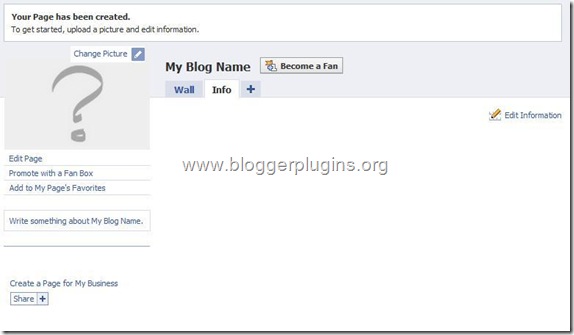
2.On the Next Page, select the options Change picture and Edit Information and you what is to be done there :)
facebook-fan-page-for-blogger-2
3.Now the most important thing that you might want is to automatically import your blog posts to the Fan Page .From the Tabs, Click on the + and Opt for Notes.
add-notes-to-facebook-fan-page
On the next screen Opt to Write a New Note
write-notes-on-face-book-page
4.You will see an Editor and some icons at the Top . Click on the Notes Icon at the top.
import-notes-to-facebook-page
5.On the Next Page, opt for Import a blog
import-blog-to-facebook
6.On the next screen, type in your blog URL, and agree to the agreement and Click Start Importing
import-blog-posts-to-facebook
If this gives some error try using the url http://yourblog.blogspot.com/feeds/posts/default
7.On the Next page, Confirm the Blog import
confirm-facebook-blog-import

8.After confirming, all your blog posts will be imported to the fan page. Now click on your Fan Page Link and get back to the fan page..
click-on-face-book-fan-page-link
9.promote-with-fan-box Now we have successfully created the Fan Page.If you want to remove some of the unwanted tabs like Discussions, Photos, Boxes etc, then you can go to that Tab and remove it.
Now you can add a Fan box to your blog so that your blog readers can join you on Facebook. To do this, goto the Page Badges Link .Select Fanbox from the Left menu
Now Select your page and the Options that you want and then opt to to add the fan box to blogger using the Blogger Button

add-fan-box-to-blogger
Now you should have the Fan box added on to your blog :)
Your Fan Page URL will look something like http://www.facebook.com/pages/Blogger-Widgets/252379165362 .Now if you have a pretty good number of fans(i think the minimum requirement is 25 fans) , then you can have a pretty facebook URL like http://www.facebook.com/cybercomputery instead of a long one like http://www.facebook.com/pages/Blogger-Widgets/252379165362 .
To claim such small usernames for your facebook page, go to http://www.facebook.com/username/ and Click on Set a username for your Pages. There you can select the small pretty user name for your fan page.Once you opt for a user name you can’t change it back again. So be careful when choosing your Facebook Fan Page Username.
10. This is the most important Step of all ;)
Be my fan on Facebook ;)  and you will get all my blog updates on my Facebook Fan Page.

Facebook Like / Recommend Button For Blogger


Facebook has come up with  a new set of Social plugins which enable you to provide engaging social experiences to your users with just a line of HTML. The Facebook Like Button is One of them. You can see a demo of the like button  on this page. The Facebook like button will allow your readers to quickly share your posts with their Facebook Friends. You can also get to know how many people liked your Blog Post . 
How to Add the Facebook Like Button Below every Post
1. First Generate the Facebook code using the options below. (Code will be updated with these details)

Top of Form
Button Type                 
Text on the Like Button
Color Scheme              
Font                             
Float                            
Location                       
Display                         
Bottom of Form
Top of Form
Bottom of Form


<b:if cond='data:blog.pageType == &quot;item&quot;'>
 <div><iframe allowTransparency='true' 
expr:src='&quot;http://www.facebook.com/plugins/like.php?href=&quot;
+ data:post.url + &quot;&amp;layout=button_count&amp;
show_faces=false&amp;width=100&amp;
action=like&amp;font=arial&amp;
colorscheme=light&quot;' frameborder='0' scrolling='no' 
style='border:none; overflow:hidden; width:450px; height:40px;'/>
</div>
</b:if>

2. Copy the Above code. Login to your Blogger Account and go to Design > Edit HTML and click on the check box which says “Expand Widget Templates”
3. Look for <data:post.body/> and immediately after that place the copied code.
4. Save the template and you should see the Like Button near each of your posts. You are done :)
Do you feel that the Like Button is boring and not so likable? – Then checkout the Facebook Like box, a styled version of the Like Button which would definitely bring you more “Likes”
Upgrading the Old Like Button to the Newer Design?
If you are trying to upgrade your Facebook Like button to the newer design, then Go to Design > Edit HTML and Expand your Widget Templates. Look for layout=standard in the Facebook iframe code. and change it to layout=button_count , save the template and you are done :)

WordPress Security Guide: Make Your WordPress Blog Hack Proof

wordpress-security
Few days back I wrote an article telling you about , but I feel after installing fresh copy of WordPress you must work to make it hack proof. As a blogger, you must understand the most important settings to change after installing new WordPress blog importance of WordPress security and also work to make your blog secure and safe. Today, I am going to give you a WordPress security tips and guidelines. Lets start :
I’ve divided this tutorial into three sections :
   
    * Basic security techniques
    * Advance security techniques
    * WordPress security plugins
    * User suggestions

Basic Security Techniques

    Update regularly

    Update your WordPress version and plugins as soon as they get released but make sure you backup your database before clicking on update button. To upgrade WordPress automatically you can use this plugin called Automatic WordPress Upgrade

    Keep root directory clean

    Do not keep unnecessary php or html files in the root directory. Keep it as clean as possible.

    Disable directory view

    You can easily view the themes and plugins directory of any blog. It can be a security factor, so it is recommended to disable directory view. For it, open Notepad, do not write anything in it and save it as Index.php and upload it in your Themes as well as Pluginsfolder. Have a look :
    disable-directory-view

    Change default username and password

    It is not at all recommended to keep the username as admin. So you must change it, to do this you can use this plugin called Username changer. Also change the default password.
    Note : Always keep a fresh and new password for your WordPress blog that you’ve never used before. Do not keep your blog’s password same as email password.

    Research before your install plugins

    Before installing any plugin, you must read the reviews on other blogs because you blog can be hacked with bad coded plugins. So, be careful.

    Advance security techniques

    Remove WordPress Version

    There are many WordPress themes that displays the current WordPress version, if you’re using an old version of WordPress, hacker can know easily about it, so it is must to remove it. How ? I’ll tell you :
    • In the dashboard, Under Appearance Click on Editor and open header.php file
    • Now, search for the following code and remove it
    <meta name=”generator” content=”Wordpress <?php bloginfo(‘version’); ?>” />
    • Removing this code, will not display the WordPress version in the source code.

    Disable “WP-” access to search engines

    There is no need to index all your content to search engines, this can be a security issue as it becomes easy for a hacker to search for vulnerable files through advance search methods. It is recommend to limit access to search engines to those folder that starts with “wp_”.
    To disable the access, refer to this article.

    WordPress Secret Keys

    Secret keys is used to generate random salts for WordPress cookies. It is a better way to encrypt information that is stored in WordPress cookies. Follow the steps below to add secret keys to wp-config :
    • Visit this link and copy the code from there. Basically, they are randomly generated secret keys.
    • Open wp-config.php file and paste those 4 lines in it
    • Save your work and you’re done

    WordPress Security Plugins

    Login Lockdown

    With this plugin you can record the IP address of every failed WordPress login attempt. After ‘n’ number of failed attempts, this plugin will block that particular IP for 5 minutes. This helps to stop brute force attack to your blog. Click here to install.

    WP Security Scan

    We all know that the default WordPress database prefix is “wp_”. Many hackers and bad coded plugins uses this prefix to make SQL injections, so it is must to change it. You can change it by installing a simple plugin called WP Security Scan

    User Suggestions : Make sure the theme developer works on future updates
    Robin gave a comment that, recently one of his blog got hacked due to the vulnerability spotted in his theme. He used a free version theme, developed by ThemeJunkie. So, make sure the theme or plugin developer works on it to bring future updates in order to get maximum security.

    Twitter Delicious Facebook Digg Stumbleupon Favorites More